
Top Stories
Unlock Roku’s 9 Secret Menus NOW for Enhanced Streaming!

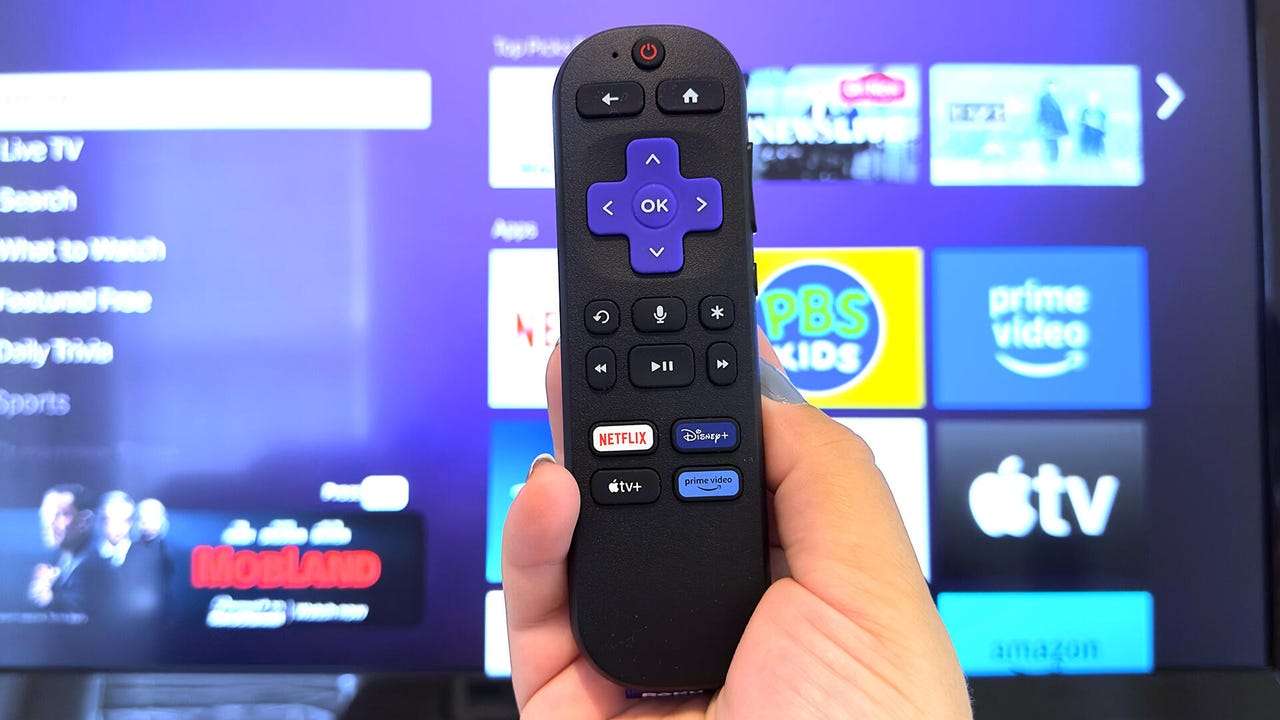
UPDATE: Roku users can now access nine secret menus on their devices, revealing advanced features and diagnostic tools that can enhance your streaming experience. This discovery is a game-changer for tech enthusiasts who want to unlock the full potential of their Roku devices.
Just announced, these hidden menus allow users to perform functions like viewing CPU temperature, running speed tests, and even soft resets—all with a few quick clicks of the remote. For those frustrated with lagging streams or app issues, this could be the solution you’ve been waiting for.
IMPACT: Accessing these menus can significantly improve your Roku’s performance and provide insightful data about your streaming habits. Whether you want to troubleshoot connectivity problems or just explore, these shortcuts make it easy to dive deep into your device’s capabilities.
Here’s how you can unlock these features on your Roku:
1. **Developer Settings:** Access this menu to enable the Development Application Installer and sideload test channels. To unlock, hit Home three times, press Up twice, and then tap Right, Left, Right, Left, Right.
2. **Network Menu:** Quickly check your IP address and internet connection. Tap Home five times, followed by Right, Left, Right, Left, Right.
3. **Wireless Secret Screen:** Monitor your Wi-Fi signal strength and run speed tests. Access it by pressing Home five times, then Up, Down, Up, Down, Up.
4. **Reset and Update (Secret Screen):** Perform a factory reset or refresh your device. Press Home five times, Fast Forward three times, and Rewind twice.
5. **Ads and Screenshots (Secret Screen 2):** Gain control over ad settings and screenshot formats. Access this by pressing Home five times, followed by Up, Right, Down, Left, Up.
6. **HDMI Secret Screen:** View supported resolutions and refresh rates. Reach this menu by pressing Home, then Down, Left, Up, Up, Up.
7. **Platform Secret Screen:** Get detailed performance data, including CPU temperature and battery levels. Access it by tapping Home five times, then Fast Forward, Play/Pause, Rewind, Play/Pause, Fast Forward.
8. **Channel Info Menu:** View version details for apps like Netflix and Disney+. This menu lets you uninstall troublesome apps quickly.
9. **Reboot Shortcut:** Restart your Roku with a quick button press: Home five times, then Up, Rewind twice, and Fast Forward twice.
DEVELOPING: If you encounter issues accessing these menus, remember to press the buttons quickly—timing is crucial. Also, Roku’s mobile app can serve as an alternative remote if the physical one is unavailable.
These revelations come as Roku continues to enhance its user experience, with CES 2026 showcasing new innovations in smart technology. For those who love to tinker, these hidden features provide valuable insights and control over your streaming device.
Stay tuned for more updates on Roku and other tech developments as they unfold. Don’t miss out—share this with fellow Roku users to help them unlock their devices’ potential now!

Cosmic Mystery Deepens: Where Are the Universe’s Defects?

Lady Bulldogs Shine in Postseason Awards Following Final Four Run

CALV Hosts Essential Class for Local Real Estate Professionals

Urgent Alert: “Spaving” Surges as Shoppers Overspend Online

Jefferies Initiates Coverage on Insmed with “Buy” Rating

Three Dog Night to Perform with Ambrosia at Mayo Civic Center

Urgent Announcement: Charles M. Payment Passes Away at 78

Houston Education Foundation Donates $4,592 for Student Programs

Beeks Financial Cloud Shares Drop 7% Amid Increased Trading Volume

Foreign Inflows into Japan Stocks Surge to ¥1.34 Trillion

University of Hawaiʻi Joins $25.6M AI Project to Monitor Disasters

Sydney Sweeney Embraces Body Positivity Amid Hollywood Challenges

Hudson Williams Gains Popularity as Breakout Star on Heated Rivalry

Urgent Farewell: Joleen Chaney Leaves Legacy at KFOR

Boeing’s Merger with McDonnell Douglas: A Strategic Move Explained

$1.25M Grant Advances Hawaiʻi’s Real-Time Hazard Monitoring

Derrick Dove and ABAC Band Set for Free Americana Concert

BOYNEXTDOOR’s Jaehyun Faces Backlash Amid BTS-TWICE Controversy
-
Business9 months ago
Foreign Inflows into Japan Stocks Surge to ¥1.34 Trillion
-
Science9 months ago
University of Hawaiʻi Joins $25.6M AI Project to Monitor Disasters
-
 Entertainment9 months ago
Sydney Sweeney Embraces Body Positivity Amid Hollywood Challenges
-
 Entertainment7 months ago
Hudson Williams Gains Popularity as Breakout Star on Heated Rivalry
-
 Top Stories8 months ago
Urgent Farewell: Joleen Chaney Leaves Legacy at KFOR
-
 World9 months ago
Boeing’s Merger with McDonnell Douglas: A Strategic Move Explained
-
 Science7 months ago
$1.25M Grant Advances Hawaiʻi’s Real-Time Hazard Monitoring
-
 Entertainment8 months ago
Derrick Dove and ABAC Band Set for Free Americana Concert
-
 Top Stories9 months ago
BOYNEXTDOOR’s Jaehyun Faces Backlash Amid BTS-TWICE Controversy
-

 Health6 months ago
Bodybuilder Eugene Teo Transitions to Mindful Movement for Health
-

 World6 months ago
San Francisco Airport to Host 16 Nonstop Airlines to Europe in 2026
-

 Top Stories7 months ago
National Coast Guard Museum Set to Open in 2027 After Funding Secured